
Omnichannel Contact Center
Configuration: Load percentage
Reading time | 1 minute
- CONTENT
- About
- Load Percentage fields
About
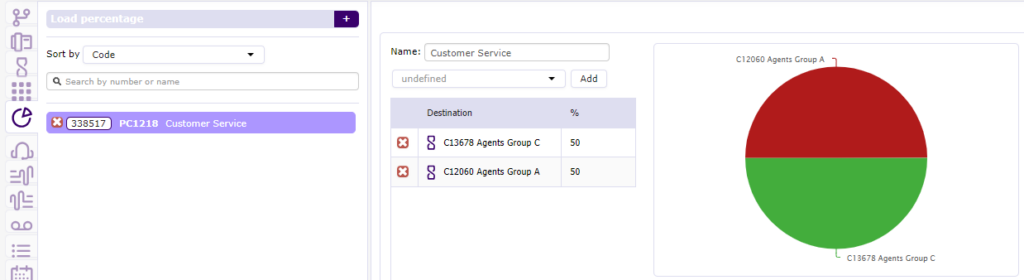
Load percentage node allows to distribute calls in your flow by % to the next node selected for each % established.
Load Percentage fields
| Nombre | Descripción |
|---|---|
| ➕ New | It allows to create a new Load Percentage node. |
| Sorty by… | It allows to sort the nodes by: Name ID Code |
| 🔍 Search by | It allows to search a Load Percentage Node available in your account by name or code. |
| Name | Name related to the Load Percentage node selected. |
| Add | Field to add the nodes related to the Load Percentage distribution. |
| Destinations and % | It shows the lists of nodes added before to link a % in order to distribute the calls based in the % you wrote. The total of % overall can’t be higher than 100%. |
| Graph | It shows a pie chart with the destinations selected and the % for each destination. It will be updated everytime the destination or the % is modified on the Destinations list. |