
WhatsApp Out: Opt-out user’s management
Reading time | 1 minute
Description
The WhatsApp opt-out policy refers to the user’s right to unsubscribe or stop receiving unwanted communications, and it is a fundamental requirement for companies under WhatsApp policies.
💡 If a company violates these rules, it risks account suspensions by Meta.
How does it work in Enreach?
Enreach has implemented an automatic system that allows users to exercise their right to stop receiving customer communications: at any time during the conversation, the user can type ‘opt-out‘ in the chat to unsubscribe, or alternatively type ‘opt-in‘ to reactivate notifications.
💡 If the user types opt-out, the system will block any outgoing WhatsApp messages to the user, whether they are sent via API or by an agent.
How to add a privacy message
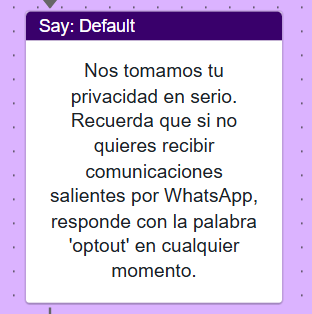
You must add a message informing users of this option during the flow of your conversation with the customer.
Below, we provide a text that you can copy and paste into the flow:
We take your privacy seriously. Remember that if you do not want to receive outgoing WhatsApp communications, type the word ‘optout’ at any time.
How can I see if the user has opted out?
From Studio and the Contacts section, you can see whether the user has opted out of receiving outgoing messages from your WhatsApp number in the WhatsApp Opt-Out column:
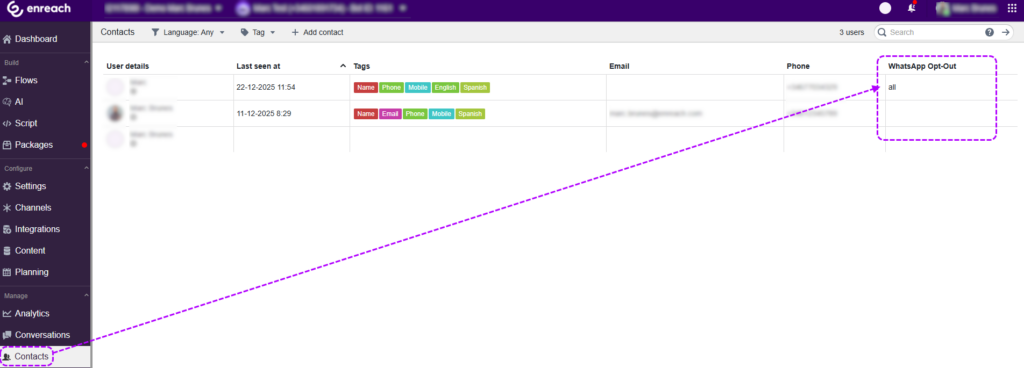
- If no information is displayed, it means the user accepts receiving outgoing messages from your WhatsApp number.
- If the word ‘all’ appears, it means the user has requested not to receive outgoing messages from your WhatsApp number.