
Omnichannel Contact Center
Configuration: DTMF
Tiempo de lectura | 2 minutos
- CONTENT
- About
- DTMF Menu Fields
About
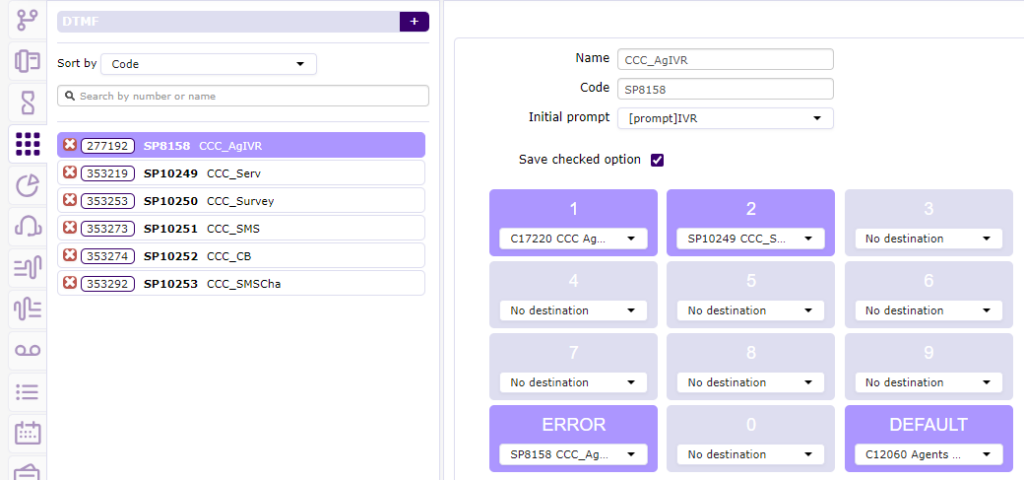
DTMF allows to configure a menu with different routings based on the number dialed by the user from 0 to 9 with Error and Default routing settings.
DTMF Menu fields
| Field | About |
|---|---|
| ➕ New DTMF | It allows to create a new DTMF menu. |
| Sort by… | Sort the DTMF menus by: Name ID Code (SPXXXX) |
| 🔍 Search | It allows to search by name or ID the DTMFs menus created in your account. |
| Name | The name of the DTMF menu. Limited to 10 characters.. |
| Code | Code created by the system to the DTMF menu. This field can’t be modified.. |
| Initial prompt | Message or announcement for the the DTMF menu to explain the different options enabled in the menu. |
| Save checked option | It allows to save the option dialed by the user. This information will appear inside the Call Detail in the Poll column. |
| Options | Numbers from 0 to 9: It allows to configure a different routing from 0 to 9: you will be able to choose any node from your account except agents or lines. Error: in case the user choose a number without routing it will be routed to the Error option. If you didn’t choosed any node for the Error option, the DTMF menu will repeat the announcement. Default: in case the user didn’t choosed any option during the announcement or after 10 seconds after the announcement, the user will be routed to the node configured for the Default option. If you didn’t choosed any node for the Error option, the DTMF menu will repeat the announcement. |