
Omnichannel Contact Center
Details Module
Reading time | 8 minutes
- CONTENT
- Search Parameters
- Search Options
- Call List
- Frequent Caller List
- Chat List
- Chat Search Options
- Conversations List
- ACD Report
About
The Details module shows you detailed information about inbound/outbound calls on your voice channel and the conversations handled in your Digitals Channels (WhatsApp, Webchat or Email).
Search Parameters

| Name | Description |
|---|---|
| Accounts | Chose your account. If you only have one account, it will be loaded by default. |
| Calls | Chose the direction of the call search (Inbound/Outbound). |
| Date form | Chose the date and if you want to see the information during the Time slot selected. |
| Restore Values | It restores the values of the search. |
| Search button | Execute searching based on the setted values. If not, and you click on Search without any values, it will search the inbound calls for the current day. |
| Search Options | It shows the Search Options form. See the information below to see the options available. |
| UID | Write the UID (unique ID) to search an specific call. |
Search Options
The Search Options shows filtering options to perform specific searching.

| Name | Description |
|---|---|
| Phone number | Call filtering by Service Line. |
| Destination/Agent | Call filtering by destination or agent: it will show inbound/outbound calls received/made by the agent or destination. |
| Contact | Call filtering by contact number: it will show inbound/outbound calls based on the contact number. |
| View | Entire Call. Shows final destination and total call duration. Conversation at Destination: Shows all nodes (Agents, Queues, Extensions…) involved in the call and call duration per destination. |
| Show transcription | Enables transcription option for the call (if it’s enabled). This service is enabled by service line. Contact us for more information about costs and performance. |
| Include | All: shows all the data related to the call. See the options available below. Agent note: shows the notes wrote by the agent on the agent module. IVR Data: shows the information received from a webservice or any internal node information saved on the IVR. Poll: NPS Contact: Shows the information related to the contact number found on the Adress Book (if it’s enabled). Typifications: Shows call typification for the call made by the agents. Call ID: Shows unique ID for the call. |
| Call Status | Answered. Calls answered by an agent or destination. Busy. Calls finished in a busy destination. (E.g.: call flow forward inbound call (with no queue) to a mobile destination which is busy). Not delivered. Calls delivered to a destination not reachable. (E.g.: call flow forward inbound call (with no queue) to a mobile destination which is offline or to an IP destination is not registered). Not answered. Calls were delivered to a destination doesn’t answer the inbound call (E.g.: the agent heard the ring tone but doesn’t answer the inbound call). Abandoned. Calls where the user hang up before being attended waiting on the queue or hanged up during a message |
| Duration | Filtering by call duration based in seconds (greater/lower than X seconds). |
| Recording | Filtering by recorded calls or not recorded calls. About call recording 👇 Call recording can be enabled by default on the service line (it means all the inbound/outbound calls related to the phone number will be recorded) or managed by the agent: once the agent starts call recording on the agent recording button on the agent module, the system will start the call recording from that moment. Once started it can be stopped. |
Call List
It shows the result of the search values.

| Name | Description |
|---|---|
| Calls | Shows the result of the search values. |
| Contact | Contact number from the origin or destination (outbound callss) |
| Date | day-month-year related to the call. |
| Destination/agent | Where the call ends. |
| Duration | Entire call: total duration of the call. Conversation at destination: call duration per node. |
| File | Recorded call audio file (if recording is enabled). ▶️ It allows to listen the call recording.  ⬇️ Download the call recording.  ❌ Delete the call recording.  📄 It shows call transcription. These options are related to user privileges and contracted services for your account. |
| Group by |  Group the call list by: Account: show all calls grouped by your account. Phone number: show all calls grouped by your service lines. Destination: show all calls grouped by destination or nodes who handled the calls. Contact: show all calls received/made by contact number. Status: show all calls grouped by status.Text: show all calls grouped by matching the Text field.Every option will show a summary about the number of calls by the Group by option selected. |
| mm:ss | Call Duration time display. It shows the information in minutes+seconds or only seconds. |
| Phone number | Service line. |
| Random | Writing the number of calls that you want to see the system will search randomly calls from the list. E.g.: if I write “2” the Call Detail will search randomly 2 calls for the time period I wrote. It can be useful for quality purposes for listening a call from a specific agent. |
| Show all |  Filtering by all calls or the unattended users. |
| Status | Answered. Calls answered by an agent or destination. Busy. Calls finished in a busy destination. (E.g.: call flow forward inbound call (with no queue) to a mobile destination which is busy). Not delivered. Calls delivered to a destination not reachable. (E.g.: call flow forward inbound call (with no queue) to a mobile destination which is offline or to an IP destination is not registered). Not answered. Calls were delivered to a destination doesn’t answer the inbound call (E.g.: the agent heard the ring tone but doesn’t answer the inbound call). Abandoned. Calls where the user hang up before being attended waiting on the queue or hanged up during a message. |
| Time | hour-min-sec related to the call |
| XLS/CSV | Download the call detail report on Excel or CSV (Comma Sepparated Values) format. |
Frequent Caller List

It shows a list of the most frequent contact numbers (for inbound and outbound calls).
| Name | Description |
|---|---|
| Total Frequent callers | Summary about total calls on the account. |
| Search for source number | Search calls summary based on the contact number. |
| Recall ratio | Ratio of recalls by contact number. |
| Contact | Calls grouped by contact number. |
| Total calls | Total calls received by the contact number. |
| Total duration | Total call durations (secons) by the contact number. |
| Average minutes per call | Average minutes per call by the contact number. |
| % over total calls | Percentage about calls received based on the contact number comparing the total calls received on the account during the period selected. |
| % over total duration | Percentage about call duration based on the contact number comparing the total calls duration received on the account during the period selected. |
Chat List
If you have enabled the Webchat and Whatsapp Channel, you will see the Chat list tab on the Call Detail in order to see all conversations managed by your agents from these channels.
Chat Search Options
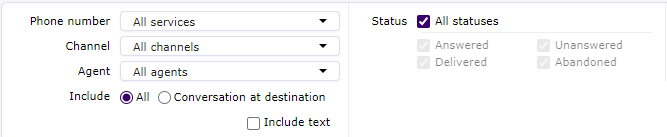
| Name | Description |
|---|---|
| Agent | Filter by agent. |
| Channel | Filter by channel available. |
| Include | All: it shows where the conversation ends. Conversation at destination: it shows all nodes involved in the conversation. |
| Include text | It shows the internal ID for the conversation. |
| Phone number | Filter by service line. |
| Status | Filter conversations by status. |
Conversations List

| Name | Description |
|---|---|
| Agent | Agent who answered the conversation. |
| Destination | Destination who handled the call. |
| Actions | Download icon: download the coversation in TXT file. The file’s name will be the UID.See icon: see the conversation between the customer and the agent. |
| Group by | Group conversations by: Channel: Whatsapp or Webchat. Service: group conversations by service lines. Visitor: group conversations by contact information. Destination: group conversations by Destination (agent or Bot). Queue: group conversations by the queue. Agent: group conversations by the agent who handled the conversation. Origin: group conversations by Origin. Status: group conversations by status. |
| Visitor | Information about the customer. In case of Whatsapp channel it will show the contact number. The Webchat channel will show the contact information you requested on your website if you have a form enabled before starting the conversation. |
| UID | Internal ID for the conversation. |
| Channel | It shows from which channel started the conversation: Whatsapp or Webchat. |
| Messages | It shows the number of messages from the customer and the agents have been sent during the conversation. |
| Queue | It shows the related queue to your service. |
| Service | It shows the service line related to your channel. Whatsapp (displayed as phone number) or Webchat (displayed as: WBSXXXX). |
| Duration | It shows the time related to the conversation. |
| Total Conversations | It shows the total conversations received during the period selected. |
| Origin | It will show the public IP or “Private IP” (if the user hides this information). |
| Status | It will show the status of the related conversation. |
| Creation date/time | It will show when we received the conversation day-month-yeaer/hour-min-sec. |